Terminals and online payments
Accept cards at your counter and online
Terminals for your business and online payments for your store. The next business day, it's all in your Binkio account.
- Visa
- Mastercard
- American Express
- Carnet
- Meal vouchers
Tap.
Your customer taps or inserts their card, or pays in your checkout from their phone.
Approved.
The terminal or your store confirms the payment and your customer gets a receipt.
In your account.
The next business day, the payment is in your Binkio account, with till, card and fee details.
Card payments
Two ways to get paid, one account.
Card present at your counter and card not present in your online store.
Card present
At your counter
Physical terminals to take chip or contactless payments, with an instant receipt.
- Multiple tills and stores
- Printed or digital receipt
- Status of every terminal
- Reconciliation by till
Card not present
In your online store
Ready-made checkout, payment links, API and plugins for your store.
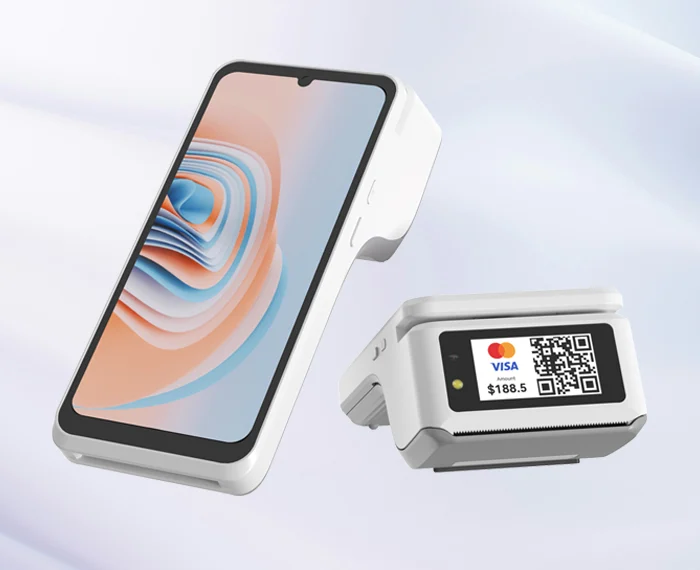
Your terminal
NEWPOS 9830. Smart and complete.
An Android terminal with a large touchscreen, code scanner and built-in printer. Accept any card and hand over the receipt on the spot.
Android 13
Upgradable to Android 15
Octa-core 2.0 GHz
With security module
6.745" display
HD+ · 1600 × 720
3,420 mAh battery
Long-lasting
Contactless (NFC)
Cards and phones
Chip and stripe
EMV level 1 and 2
Code scanner
QR and barcodes
Built-in printer
Fast and quiet
Your money
It all lands in your Binkio account.
What you collect at your terminals and online comes together in one place the next business day, with every payment itemized.
Next business day
Every payment is credited to your Binkio account the next business day.
Withdraw to your bank
In Mexico via SPEI; in Colombia, in Colombian pesos.
Reconcile by terminal
Every payment shows which till and store it came from.
Everything on record
Payment, fee and net amount in your history, ready for your accountant.
For your business
If you sell, accept cards.
Restaurants and cafés
Retail
Clinics and services
Online stores
Travel and experiences
Events and food trucks
Availability
Mexico and Colombia.
You need a verified business account (KYB) to operate. Every payment goes through anti-money-laundering controls.
 Mexico
Terminals and online
What you collect lands in your Binkio account and you withdraw it to your bank via SPEI.
 Colombia
Terminals and online
What you collect lands in your Binkio account and you withdraw it to your bank in Colombian pesos.
Binkio Pay, S.A.P.I. de C.V.
Processes card payments as a payment aggregator, in Mexico and Colombia.
FAQ
Questions? We've got answers.
Which cards can I accept?
Visa, Mastercard, American Express, Carnet and meal voucher cards, credit or debit, chip or contactless.
When do I get the money?
Every payment is credited to your Binkio account the next business day. From there you withdraw to your bank: via SPEI in Mexico and in Colombian pesos in Colombia.
How much does it cost?
The fee depends on your industry and volume. An advisor will put together a quote for you.
How do I get the terminals?
Terminals are purchased. We use the NEWPOS 9830: Android, touchscreen, code scanner and built-in printer. Your advisor will give you the price.
Can I take payments in my online store?
Yes: with Binkio's checkout, payment links, the API and webhooks, or plugins for the main e-commerce platforms.
Who processes card payments?
Binkio Pay, S.A.P.I. de C.V., as a payment aggregator, in Mexico and Colombia.
What do I need to get started?
A Binkio business account with your business verification (KYB) approved.
How much would you take in cards this month?
We'll put together a quote based on your industry and volume.
- 1Talk to an advisor
- 2Verify your business
- 3Buy your terminals
- 4Get paid